

K7XD Mapper Engine APK is a keyboard and mouse mapper for Android. You plug a keyboard and mouse into your phone over OTG or Bluetooth, then assign keys to a game’s on-screen buttons. It’s on Google Play from a developer called K7XD Studio, and it’s new. It launched in October 2026 and sits at 100+ downloads. So here’s what the listing actually says, what it leaves out, and what to know if you’re planning to use it with Free Fire.
What is K7XD Mapper Engine APK?
The Play Store description is short. It says the app helps you set up keys with a mouse and keyboard to play games on your phone over OTG or Bluetooth, and that it aims to be simple but agile on Android devices. The tagline promises precise key mapping, just like in an emulator.
In plain terms, it’s meant to give you the PC-style control setup that emulators offer, but on a real phone. You hold your phone, or prop it on a stand, and play with WASD and a mouse instead of thumbs.
One thing worth clearing up. The listing never names Free Fire or any other game. Lots of pages tie K7XD to Free Fire, but that comes from the people writing about it. The developer only says it’s for games on your phone.
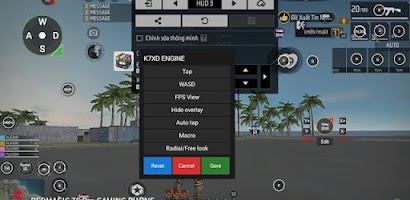
K7XD Mapper Engine features
Here’s what the listing actually claims:
- Key mapping with a mouse and keyboard
- Connection over OTG or Bluetooth
- A simple setup, with an emulator-like feel
- Support for Android devices in general
And here’s what it doesn’t say. There’s no list of supported games, no minimum Android version I could read, no setup guide and no mention of gamepads. AppBrain’s automated summary also points out that it focuses less on gamepad support than rival apps do. If you need a controller, look elsewhere.
How new is it, and does that matter?
Yes, it matters. The app has about 20 reviews and 100+ downloads. A 4.3 average from 20 people tells you the early users are happy, not that the app has been through the wringer. AppBrain recorded 170 installs in the last 30 days and noted there isn’t enough rating data yet to judge.
It does get updated, with the Play page showing November 3, 2026, but there’s no changelog to read.
For comparison, K2er is a more established mapper on Google Play, with paid plans. Even there, one recent reviewer who bought the lifetime plan to play Free Fire says the aim drag stops working after a few shots. Free Fire is a hard game for any mapping app, so don’t expect a perfect setup from a brand-new one.
Is K7XD Mapper Engine APK safe?
The Google Play version is the one to use. The listing’s Data safety section says the developer collects no data and shares none with third parties. That’s the developer’s own declaration, so treat it as a claim, not proof. The app is also tiny at roughly 1.8 MB.
Mapping apps often ask for sensitive access, like drawing over other apps or accessibility permissions. I couldn’t find a permission list for K7XD, so read what it asks for before you tap Allow.
If you want an APK file instead of Play, match two things: the package name com.datpc207.vdmaper and the developer name K7XD Studio. A copy from a random download site can’t be checked against Google Play, and for an app that sits between your keyboard and your game, I’d stick to the store.
Can you use it with Free Fire? The ban risk
This is the part the usual “it’s useful for Free Fire” write-ups skip. Garena’s anti-hack policy treats any third-party app it didn’t release, or any modified game client, as cheating. Its stated position is zero tolerance, with permanent account bans and device bans. Sportskeeda’s coverage of the policy spells this out for tools like GFX tools and skin tools.
Whether a mapping app trips that, nobody outside Garena can tell you. Guides for other mapping apps, like Octopus, warn about ban risk and note that Garena doesn’t officially support them. So the honest summary is that it’s a risk with no guarantee either way. Don’t test it on an account you can’t afford to lose.
What you need to use a keyboard and mouse on Android
For OTG, your phone has to support USB OTG, and you need an OTG adapter or a small hub for the keyboard and mouse. Or use a Bluetooth keyboard and mouse and skip the cables.
Most mapping tools start from a layout like this: WASD for movement, mouse movement for the camera, left click to fire, right click to aim, R to reload and Space to jump. It’s a common starting point from mapping profiles for other tools, not something K7XD ships, so expect to build and test your own layout.
How to install K7XD Mapper Engine APK safely
- Open Google Play and search for K7XD Mapper Engine.
- Check that the developer is K7XD Studio and the app is in the Tools category.
- Look at the Install button for the current price in your region.
- Install it and check the permissions it asks for before granting any.
- If you use an APK file instead, confirm the package name com.datpc207.vdmaper after installing.
K7XD Mapper Engine APK FAQs
Is K7XD Mapper Engine APK free?
Check your Play page. AppBrain tracks it in a Top Paid chart, so the price may differ by country. AppBrain lists no ads.
Is it made for Free Fire?
No. The Play listing doesn’t name any game. Free Fire is just a popular use for mapping apps, and it comes with the ban risk above.
What’s the package name?
com.datpc207.vdmaper.
Does it work over Bluetooth?
Yes, according to the listing. It supports OTG and Bluetooth.
Does it need root?
The listing doesn’t mention root. Check the app’s own setup screen.
Is there a pro or unlocked APK?
Any pro or unlocked copy is a repackaged file, so skip it. The app is small, and the only verifiable version is the one on Google Play.
What are the alternatives?
K2er is another keyboard, mouse, and gamepad mapper on Google Play, with paid plans.
Final word
K7XD Mapper Engine APK is a real, very small, and very new keyboard and mouse mapper from K7XD Studio. It looks decent in early reviews, but 100+ downloads isn’t a track record. Get it from Google Play, check the permissions, and think twice before running it with Free Fire on an account you care about. This page will be updated as the app grows.