
Some games sell you speed. OMSI 2 sells you patience, and a surprising number of people love it for that.
You sit in a bus. You check the timetable, open the doors, take on passengers, pull out into traffic, and try to reach the next stop without braking so hard that anyone spills their coffee. That’s the game. It sounds dull on paper, and it’s one of the most devoted simulator communities on PC.
For years, the only way to play it was on a Windows computer. That’s changed, in a roundabout way. There’s now an Android build you can install on your phone. It comes from an open-source project called openOMSI, and it’s a little different from what most people expect when they search for an “OMSI 2 APK.” I’ll explain exactly what it is, what you need before you start, and how to get it running, because the details matter here more than they do for most games.
If you’re after the short version, it’s this. The APK on this page is free. The game files are not included, so you need your own copy of OMSI 2 from a PC, and you copy that folder to your phone. Read on, and it’ll make sense.
What is OMSI 2?
OMSI 2 is a bus simulator for Windows. It was developed by MR-Software, a small German studio, and published by Aerosoft. It came out on December 11, 2013, and it’s the successor to the original OMSI.
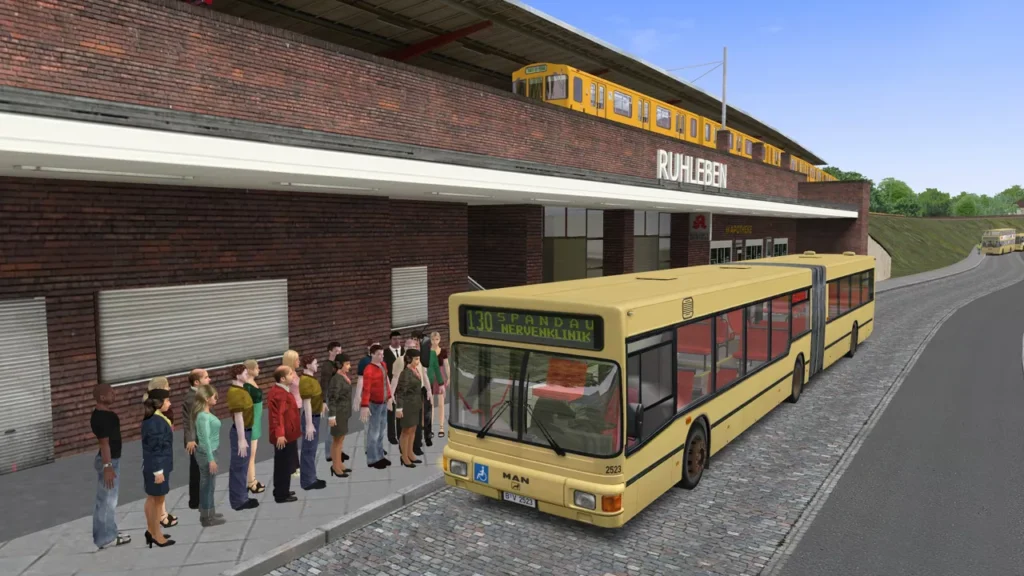
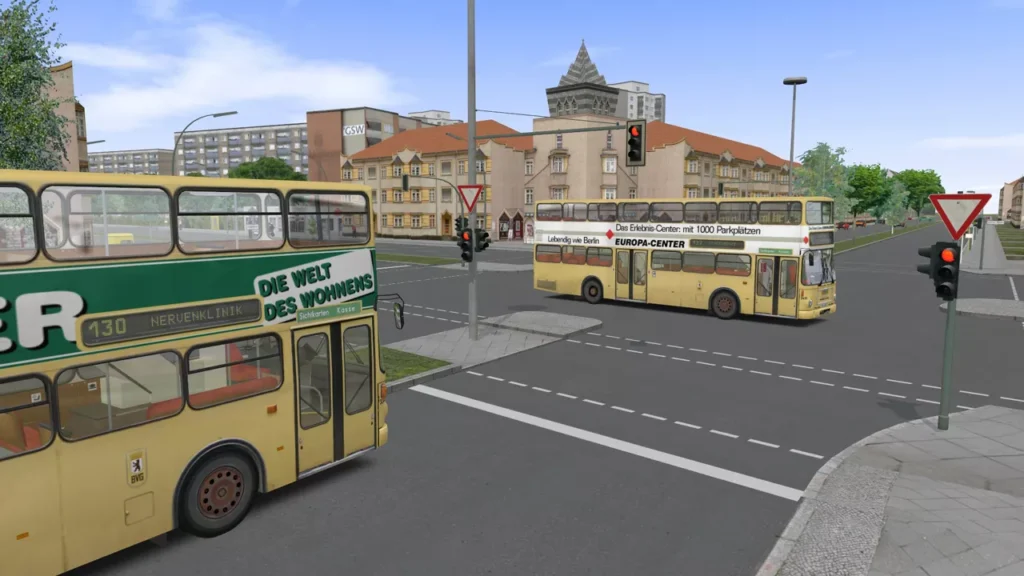
The base game puts you in Spandau, a district of Berlin. The map is recreated at full scale and set between 1986 and 1994, and you can pick the year you want to drive in. The starting route is Line 5, a roughly 12 km run from Ruhleben to the Spandau psychiatric clinic, driven in a MAN NG272 articulated bus. The base game also includes MAN NL202, SD200 and SD202 buses, and a small fictional map called Grundorf that’s used for the tutorials.
What keeps people playing is the realism. You follow timetables. You handle doors, ticketing, and the controls in the driver’s cab. Traffic moves around you, the weather changes, and the physics make a bus feel like a heavy vehicle, not a car with a different skin. It isn’t about winning. It’s about doing the job well.
The developers behind the base game have since stopped working on it, but the community hasn’t. Add-ons keep arriving through Aerosoft on Steam. There are more than 120 pieces of content, including maps like Hamburg, Mallorca and London, plus buses, AI vehicles and utilities. Steam reviewers rate it Very Positive, with 82% of more than 2,400 reviews positive, and it’s regularly discounted. At the time of writing, the Steam price was $20.99, down from $29.99.
Is there an official OMSI 2 APK?
No. The official game is Windows-only, with no Android version from Aerosoft or the original developers.
What does exist is openOMSI. It’s an independent, open-source project that recreates OMSI 2 from scratch in the Rust programming language. It contains no code or assets from the original game. Instead, it reads the files of a genuine OMSI 2 installation and runs them using its own engine. That’s why it can run on a phone.
Three things are worth being clear about:
- It isn’t made by Aerosoft or the original studio. The project says it’s independent and not affiliated with them. OMSI and OMSI 2 are trademarks of their owners.
- It doesn’t include the game. It “contains no game content” and won’t start without an installed copy of OMSI 2. You need to own the game.
- It’s an early release. The developers say so themselves, with a plain “expect bugs.” Some features may be missing or broken, and they change between versions.
That honesty is a good sign, not a bad one. It’s a project that’s moving quickly, with new builds appearing often. Version 0.2.25, released on October 9, 2026, is the latest at the time of writing, and several releases landed in the days before it.
If you ever see a page offering a full “OMSI 2 APK” that’s a few dozen megabytes with everything included, be suspicious. The real game is far larger, and the real Android build has no game content in it at all.
What you need before you download
Take a minute to check this list first. It will save you an hour later.
- A copy of OMSI 2. Steam or retail, any version. It needs the stock content, meaning the standard maps and buses. You can buy it on Steam, and it’s often on sale.
- A PC to copy the files from. You’ll move the game folder from your computer to your phone.
- An arm64 phone or tablet running Android 8.0 or newer. Most phones from the last several years qualify.
- A graphics chip that supports Vulkan 1.1. Without it, the game tries OpenGL ES 3, which may run worse.
- Plenty of free storage. The project doesn’t give a figure, but it notes that OMSI 2 has “thousands of files.” Check the size of your OMSI 2 folder on your PC and make sure your phone has room for all of it, plus a little extra.
- A USB cable or a USB stick for the transfer.
- A Bluetooth controller, optional. It works as it does on a computer, and some people prefer it.
Download OMSI 2 APK (openOMSI)
Tap the download button on this page and the file will start saving to your phone. It’s about 19 MB, because it holds the engine and the launcher but none of the game’s content. Your browser may warn you that this type of file could harm your device. That message appears for almost every APK, so it doesn’t mean there’s a problem with this one. But it’s a fair reminder to only download APKs from sources you trust.
Because the project is open source, you can check it yourself. The source code is public on GitHub, under the AGPL-3.0 license. Release builds are signed, and the project lists a checksum on its release page. For version 0.2.25, the SHA-256 listed there is:
b3bb143d24720022a489e06e4e236d7e058271f8337cefc876efaef6bdeab977
If you use a checksum app on your phone, you can compare the result with the figure on the project’s release page. If the two don’t match, delete the file.
How to install and set it up
Setting up openOMSI takes a few more steps than a normal app, but none of them are hard.
1. Install the APK. Open your downloads folder, tap the file, and allow installs from that source when Android asks. Afterwards, turn the permission off again for your browser, so other files can’t install without a warning.
2. Give it file access. Open openOMSI, then go to Settings, Apps, openOMSI, Permissions, and grant access to files and media (all-files access). Without this, the app can only read its own folder, and it won’t find your game.
3. Copy your OMSI 2 folder to the phone. On your PC, find the OMSI 2 folder. It’s the one that contains Omsi.exe, a maps folder, and a Vehicles folder. On Steam, you can right-click the game, choose Manage, then Browse local files. Copy the whole folder to your phone’s internal storage, ideally into a folder called openOMSI/OMSI 2. Use a USB cable or a USB stick. It can take a while, since there are thousands of files.
4. Point the launcher at the folder. The app looks in openOMSI/, in Download/ and at the top level of your storage. If it finds nothing, open the launcher, go to Setup, tap Browse, choose your OMSI 2 folder, then Use this folder and Save.
5. Pick a bus, a map, and a duty. On the Drive page, choose what you want to drive, and start.
For your first drive, try the small Grundorf map. It’s the tutorial map, and it’s a gentler way to learn the controls than a full Berlin route.
Installing mods
If you use add-on maps or buses, you can place mod folders, or .zip, .7z, or .rar files, in openOMSI/Mods, or install them from the launcher’s Mods page. Zip files can also stay in openOMSI/Archives. The project’s goal is for existing maps, buses, scenery, and mods to work unchanged, but it’s an early release, so expect some to behave better than others.
Controls on a phone
OMSI 2 was built for a keyboard and mouse, so the Android version adds a touch layout. Here’s how it’s arranged.
- Bottom left: a steering wheel. About 120 degrees of the rim is full lock. You can also tilt your phone to steer, which you turn on in the panel under Tilt steering.
- Bottom right: the brake and the accelerator. The harder you press on the pedal, the harder it applies.
- Top right: the cab panel, the city map, the timetable, and a screenshot button.
- Top left: the game menu, pause, and the camera views.
- In the cab: tap a switch to use it, drag from a switch to turn it, drag elsewhere to look around, and pinch to zoom.
- On foot: the bottom-left stick walks, and you push to the edge to run.
- Back key: it works as Escape.
A Bluetooth controller works too. If you plan to drive for longer than a few minutes, a controller and a phone stand make a big difference.
Key features
Berlin-Spandau and Grundorf. The stock maps from OMSI 2 are supported, alongside the buses that come with the game, including the MAN SD200, SD202, and NL models.
Realistic bus driving. The project aims to match how OMSI 2 behaves. That includes the timetable, the cab controls, and the physics of a long, heavy vehicle. It describes 1:1 behavior with OMSI 2.2.032 as a stated goal, though it’s a target and not a promise.
Weather and traffic. The builds include rain quality settings and snow ground, and recent notes mention AI traffic improvements at junctions.
A modern engine. It’s 64-bit and multithreaded, with no 2 GB memory limit, which matters for large maps.
Extras on other platforms. The project also offers LAN multiplayer and a dedicated server, and VR on Windows. On Android, the touch controls and launcher are the main attractions.
Frequent updates. The launcher can update itself, and fixes keep arriving. Recent releases have added things like gamepad profiles, mouse steering, tram support, and fixes to destination displays.
Performance and settings
Driving a bus through a detailed city is a lot to ask of a phone, so the game starts with lighter defaults on the first launch. These are 2x MSAA, no ambient occlusion, a 1024 shadow map, 60 fps, and an object distance of 900 metres. You can change all of them in the launcher’s Settings page.
There’s also a built-in safety valve. If the frame rate drops below 45, the 3D view is drawn smaller, down to 0.6 of the screen, to keep things running.
A few habits help:
- Close other apps before you start. Memory matters.
- Keep the phone cool. A hot phone slows itself down, so take breaks during long sessions.
- Turn off battery saver. It often limits performance.
- Lower the shadow and object distance settings first if it stutters, since those cost the most.
Troubleshooting
The game says it can’t find your files. Check that all-files access is granted. If it is, open Setup, Browse, and choose your OMSI 2 folder by hand.
It won’t start at all. Make sure the folder you copied is the whole OMSI 2 directory, with Omsi.exe, maps and Vehicles inside. The project says openOMSI will not start without an installed copy.
Buses look white. The textures are missing. This usually means texture folders were left out or deleted during the copy. Copy the folder again.
Your gallery shows game textures. The folders are marked so galleries should ignore them, but the gallery may need a moment or a phone restart.
An update fails. The APK must be signed with the same key as the version you already have installed. Official release builds are signed that way, so a file from a different source may not install over it.
The game closes or acts strangely. It’s an early release, so bugs happen. The launcher offers a “Copy report” and a “Report on GitHub” button when the game ends on an error, and there’s an Export diagnostics option in Setup. The export leaves out folder paths and names, and it’s worth looking over before you attach it to a bug report.
A bus gets stuck at a bridge or an invisible wall on a mod map. Press Back (Escape), open Options, and turn off collisions with map objects.
Tips for your first drive
- Start on Grundorf. It’s small and made for learning. Spend a few minutes just getting the feel of the controls.
- Learn the cab before you move. Find the doors, the indicators, and the other switches while the bus is parked.
- Follow the timetable. Open the timetable panel from the top-right menu. Arriving on time is the point of the game.
- Drive smoothly. Gentle braking and acceleration are the goal. Heavy vehicles reward patience.
- Use the city map. The map panel helps you find your way on larger routes.
- Take it slowly in Berlin. The full map is large, and you’ll learn more by driving one route well than rushing several.
- Consider a controller. Fine control of the pedals is easier with a gamepad than with a touchscreen.
About “OMSI 2 Mod APK” pages
You’ll find pages advertising an “OMSI 2 Mod APK” that promises everything included and nothing to buy. Treat them carefully. The real Android build contains no game content at all, so a file claiming to be a complete game in a small download isn’t what it says. At best it’s a repackaged copy of something else, and at worst it carries malware or asks for permissions it doesn’t need.
The file on this page is the open-source build. If you want to check any APK yourself, look at the file size, the permissions it asks for, and the checksum, and scan it with Google Play Protect or VirusTotal.
FAQ
Is there an official OMSI 2 APK?
No. The official game is Windows only. The Android build comes from an independent open-source project called openOMSI.
Is the APK free?
Yes. The APK is free and open source. You still need to own OMSI 2, which is a paid game on Steam.
Do I need OMSI 2 on a PC?
Yes. You copy the game folder from a PC installation to your phone. openOMSI contains no game content and won’t start without it.
Where do I get OMSI 2?
From Steam or a retail copy. It’s often on sale.
What phone do I need?
An arm64 phone or tablet running Android 8.0 or newer, ideally with Vulkan 1.1 graphics.
How big is the download?
The APK is about 19 MB. The OMSI 2 folder you copy across is much larger.
Is it stable?
It’s an early release, and the project says to expect bugs. Updates are frequent.
Do mods work?
The goal is for existing maps, buses, and mods to work unchanged. Results vary, since it’s early.
Can I use a controller?
Yes. A Bluetooth controller works as it does on a computer.
Does it have multiplayer?
LAN multiplayer and a dedicated server are part of the project, though check the current version for what’s available on Android.
Who made OMSI 2?
MR-Software, with Aerosoft as the publisher.
Is it safe to install?
The code is public and builds are signed, but as with any APK, check the checksum, scan the file and only install from sources you trust.
Final thoughts
OMSI 2 on a phone isn’t for everyone. It takes some setup, it needs a game you already own, and it’s still rough in places. But if you’ve ever wanted to take a Berlin bus around Spandau on your commute, it’s now possible, and it’s all down to a small group of volunteers who built it in the open. Grab the APK, copy your folder across, start on the tutorial map, and take your time. That’s what the game is for.