
Most motorcycle games on mobile work the same way. Pick a bike, pick a track, beat the clock, repeat. Projeto Grau 2 skips that loop. You get a motorcycle, a city with traffic, and nobody telling you what to do with either.
Some players spend the whole session trying to hold a single wheelie a couple of seconds longer. Others grind deliveries until they can afford a better bike. And every so often somebody rides past a police car the wrong way and ends up in a chase across the map. Same game, three completely different evenings.
This page covers the whole thing. You’ll find the APK, the install steps, fixes for the errors people run into most, a proper breakdown of the features, what the latest update changed, how to earn money without wasting time, and some settings that help the game run better on weaker phones. If you only want the file, the download button is right on this page. If you want to know whether the game is worth the storage space first, keep reading.
What is Projeto Grau 2?
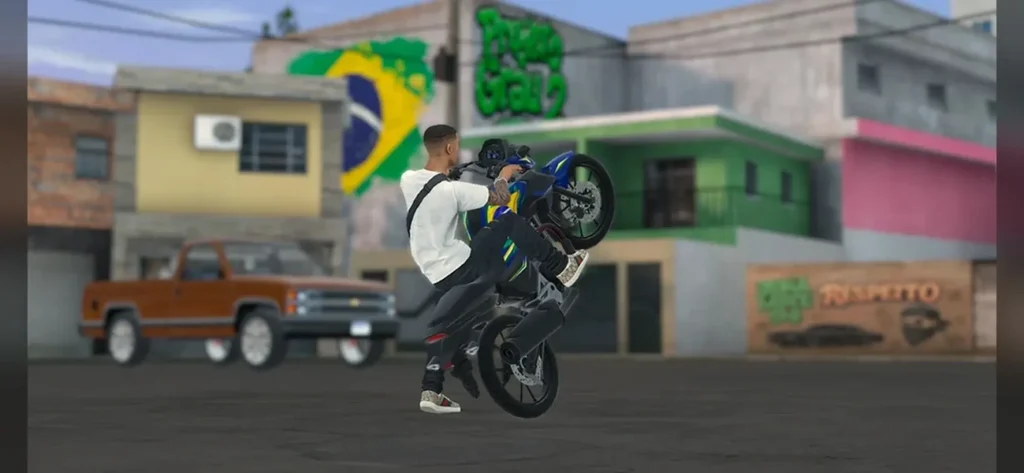
Projeto Grau 2 is an open-city motorcycle game for Android. “Grau” is Brazilian Portuguese slang for a wheelie, and “empinar” is the verb for popping the front wheel up. Once you know that, the game’s priorities make sense. The riding comes first, and everything else in the city exists around it.
The city has cars driving through it. It moves between day and night, the weather shifts, and there are jobs, a workshop, a driving school, a garage full of vehicles, and a police system that reacts when you’re reckless. You can treat it as a stunt sandbox, a work-and-earn game, or a bit of both.
That freedom is what separates it from a track racer. In a racer, you’re always doing the same thing: going as fast as possible. Here you decide the goal. And honestly, the quiet moments, like cruising through an empty street at night with your wheel in the air, are what a lot of people come for.
Similar Apps:
Who is it for?
Not everybody will like this, so it’s worth being direct.
If you want fast laps, ranked races, and a leaderboard, this probably isn’t it. The game cares about control and balance, not lap times. If you like motorcycles, enjoy practicing a skill until it clicks, and don’t mind a game that makes you earn things slowly, you’ll probably get a lot out of it.
It also suits people who like open-world games in general. Taking jobs, saving up, buying something better, and tuning it is a loop plenty of players enjoy, and this game puts motorcycles at the center of it.
How to download Projeto Grau 2 APK
Tap the download button on this page, and the file starts saving to your phone. Your browser may show a warning that this type of file could harm your device. That message appears for every APK, so it doesn’t mean something is wrong with this one. But it’s still a fair reminder to download APK files only from sites you trust.
Before you tap, a few small checks save a lot of headaches later:
- Free storage. Open-world games get large, and many download extra data on the first launch. Leave a few gigabytes free to be safe.
- Connection. Use Wi-Fi if you can. A dropped connection during the first launch is a common reason for a game that won’t start properly.
- An older copy. If you already have Projeto Grau 2 installed from somewhere else, the new file may refuse to install over it. In that case, you’ll have to uninstall the old one first. Check whether your progress is saved to an account before you do. If the game stores everything locally, uninstalling can wipe it.
- Battery. A big install on a nearly dead phone is asking for trouble. Plug it in.
How to install it
Android blocks installs from browsers and file managers until you give permission. You only need to do it once per app.
- Open your downloads folder and tap the Projeto Grau 2 file.
- If Android blocks the install, tap Settings on the pop-up and allow installs from that app. On newer versions this is under “Install unknown apps.”
- Go back and tap Install.
- When it finishes, tap Open. Don’t skip the first launch. Let it finish any extra downloads before you start playing.
- Go back into your settings and turn the permission off again for your browser.
That last step matters more than people think. Leaving “install unknown apps” switched on for your browser means any file you download later can install without a second warning.
If the install fails
The same few errors cause most failed installs. Here’s how to sort them out.
“App not installed.” Usually this means a different version is already on the phone, signed in a different way. Uninstall the old copy and try again. It can also mean you’re out of storage.
“There was a problem parsing the package.” The file may have been damaged during the download, or your Android version is too old for the game. Delete the file, download it again on a steady connection, and check that your phone meets the minimum Android version shown in the app details.
The install button is greyed out. You probably haven’t allowed installs from the app you’re using. Go back to the settings step above.
It installs but crashes on launch. Restart the phone, free up some storage, and close other apps. If it still crashes, try clearing the game’s cache from the app settings. If that doesn’t work, a clean reinstall usually does.
It runs, but the textures look gray. The update notes mention a problem like this on phones with limited memory after changing graphics quality. The fix is in the latest version, so update first. If it persists, set the graphics quality back and restart the game.
Key features
Wheelies and riding physics
This is the main attraction. You lift the front wheel, then hold it up by managing the throttle. Ease off and the wheel comes back down. Give it too much, and you risk going over. So you’re making small corrections the whole time, not pressing a button and watching a canned animation.
The game also has stoppies, burnouts, and skids, and the rider’s body moves with the bike. That sounds like a small detail, but it’s a big part of why the controls feel connected to the motorcycle instead of floating on top of it. One more thing to watch: the rear of the bike can scrape the road during a long wheelie, and that has consequences. It’s a rule that keeps you from just holding the throttle down and hoping.
An open city with real traffic
There’s no circuit. You ride through streets with cars on them, so a trip across town means weaving, braking, and sometimes cursing. The traffic turns a simple ride into a series of small decisions.
The city also moves between day and night and has changing weather. That does more than change how the screen looks. A street you know well can feel different at night or in the rain, and it keeps long sessions from getting stale.
To find your way around, you’ve got a GPS, a minimap, and a phone with apps on it. They help you locate jobs, shops, and destinations without having to memorize the map.
Jobs and earning money
Money is what drives progress. The game includes delivery work and package runs, fruit harvesting, lumberjacking and electrical work, plus a driving school where you can work toward a license. The variety matters, because the jobs let you play the city in a different way than riding around doing tricks.
The cash goes into vehicles and upgrades, so jobs are how the game moves forward. Don’t think of them as filler.
Garage, vehicles, and customization
You can buy or rent motorcycles and cars. Renting is useful when you want to try a bike before paying for it, which is something I’d recommend if the game lets you do it. In the workshop, you can change wheels, the sound system, and the vehicle’s appearance.
There’s also a dynamometer, which measures how your motorcycle performs. If you like changing one part and then checking whether it actually did something, that’s a fun feature. It makes tuning feel like more than a cosmetic exercise.
Police chases
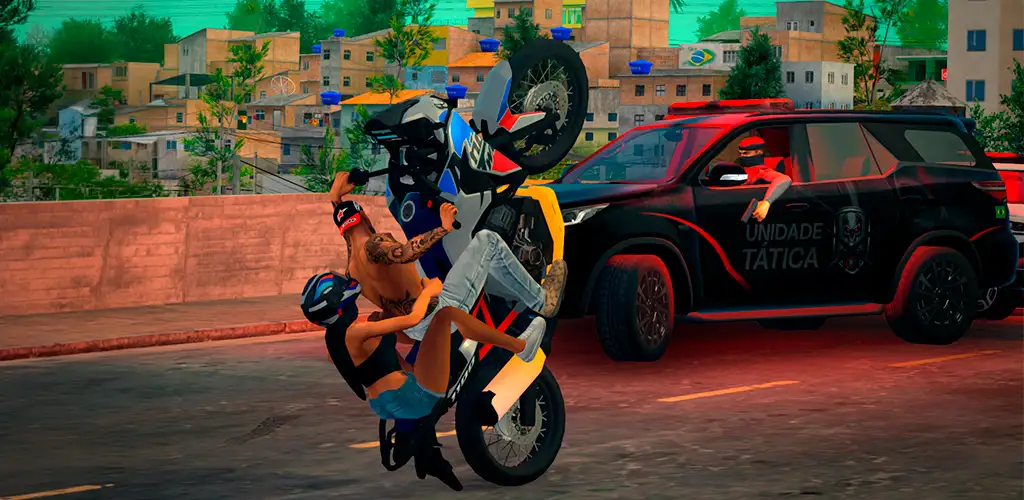
Get noticed, and the police come after you. You have to escape and lose your wanted level. Speed alone usually won’t do it. Traffic, side streets and tight turns matter more. A relaxed ride can turn into a chase in ten seconds, and that unpredictability is part of the appeal.
Drone photo mode
There’s a drone camera for viewing and recording your stunts from different angles. It’s handy after a long wheelie when you want to see how it actually looked. If you share clips with friends or post them online, this is the feature you’ll use most.
What’s new in the latest update
Two additions stand out.
The first is an app called MOLEJO, which lets you adjust how the rider’s body behaves. It uses a spring-based system you can tweak in real time, with profiles and drawers for saving your settings. If you’ve ever felt like the rider moves too stiffly or too loosely on a wheelie, this is where you adjust it.
The second is a 1ST PERSON app. It’s an adjustable first-person camera that you can set up and save separately for every motorcycle. That’s a bigger deal than it sounds, because different bikes sit differently, and one camera position rarely works for all of them. Set it up once per bike, and you’re done.
The update notes also list a long set of fixes:
- Rider hand and arm problems, like a hand touching the asphalt on one model, a hand separating from the handlebar during wheelies, and a twisted arm while skidding
- A lock that wouldn’t stay held
- An Android bug where a rewarded ad didn’t give its reward
- Gray textures after changing graphics quality on phones with low memory
- A rebalanced sound mix
Updates on games like this happen often. If something here doesn’t match what you see on your phone, trust the game.
How to do a wheelie properly
New players tend to fail in one of two ways. Either they never get the wheel up, or they get it up and flip straight over. Both come down to throttle control.
Start by getting to a moderate speed. Pulling up from a crawl doesn’t give you enough momentum, and pulling up at high speed is harder to control. Then lift the front wheel with one clear input and ease into the throttle. Once the wheel is up, you’re looking for a balance point. If the front starts to drop, add a bit of gas. If it climbs too high, ease off. Think of it as holding a seesaw level, with tiny corrections instead of big ones.
A few habits help:
- Practice on an empty road. Traffic adds pressure you don’t need while learning.
- Don’t mash the throttle. Small changes work better than big ones.
- Keep an eye on the rear of the bike. Long wheelies can scrape the bodywork, so end the trick before it gets close.
- Try different bikes. Every motorcycle has its own balance point, and a trick that’s easy on one can be hard on another.
- Use the drone camera to review. Watching a failed attempt from outside often shows exactly what went wrong.
If you use the MOLEJO app, change one setting at a time. Changing several at once makes it impossible to tell what helped.
How to earn money faster
The early game is slow on purpose, but you can speed it up with a bit of planning.
Start with whichever job is easiest to repeat. Delivery and package work is the obvious first choice, because you’re already on a bike. Do a few runs, and when you can afford something, think about whether you want a better motorcycle or an upgrade for the one you have.
Rent before you buy, if renting is available. A bike that looks great can feel wrong for the way you ride, and renting lets you find that out for a lot less money.
Try the other jobs now and then. Harvesting, lumberjacking and electrical work take you away from the bike, but they can break up the grind and show you parts of the city you wouldn’t otherwise visit. And once you have your license from the driving school, you have more options for how you travel.
Finally, avoid chases when you’re carrying cash you want to keep. Getting caught can cost you more than it’s worth.
Settings for smoother gameplay
An open city with traffic and weather is heavy for a lot of phones. If the game stutters, a few changes can help.
- Lower the graphics quality. It’s the biggest lever. If textures turn gray after you change it, restart the game.
- Close background apps. Memory is the limit on many phones, and the update notes already mention memory-related texture issues.
- Turn off battery saver while playing. It often throttles performance.
- Keep some storage free. A full phone slows everything down.
- Let the phone cool. Long sessions heat up the processor, and a hot phone slows itself down. A short break helps.
- Restart before a long session. It clears memory you didn’t know was being used.
Similar games
Projeto Grau 2 is part of a whole group of Brazilian wheelie games. If you like it, you may also want to look at Projeto Grau by Insanity Group, which has a big following on Android, Grau BH 2 Online by Pio Games, or MX Grau 2 by Box Gamers Studio. They all focus on wheelies, but they differ in map size, bike selection and how much they lean toward multiplayer or stunts. It’s worth trying a couple and seeing which one fits.
About mod APKs
You’ll find plenty of pages pushing a “Projeto Grau 2 Mod APK” with unlimited money. We don’t offer one. The file on this page is the original game.
Honestly, money is half the fun here. Jobs, upgrades, new bikes. Skip that and there’s not much left to do. Add the risk of malware, or a file that asks for permissions it shouldn’t need, and it’s a bad deal. If you want to check any APK yourself, look at the file size, look at the permissions it asks for, and run it through Google Play Protect.
FAQ
Is Projeto Grau 2 free?
Check the app details on this page. The update notes mention rewarded ads, which usually points to a free game with ads.
Do I need an internet connection?
It can depend on the version. Open the game with no connection and see what happens.
Why does the game lag?
An open city with traffic is demanding. Lower the graphics quality, close other apps and restart the phone.
Why are my textures gray?
That was a known problem on phones with low memory after changing graphics quality. The latest update says it’s fixed, so update if you still see it.
Will I lose my progress if I reinstall?
It might, if the game saves locally and not to an account. Check before you uninstall.
How do I do a wheelie?
Lift the front wheel and control it with the throttle. Too little and it drops, too much and you flip. There’s a full section above with practice tips.
What does “grau” mean?
It’s Brazilian Portuguese slang for a wheelie.
Can I play with friends?
Check the menus in the version you’re running. Features can change between updates.
Will it run on my phone?
Most recent phones should be fine. Older ones may need lower settings. The minimum Android version is in the app details on this page.
Is it safe to install?
The file here is the original game, not a modified one. As with any APK, scan it, keep an eye on permissions, and install only from sources you trust.
How do I update the game?
Download the newest file from this page and install it over the old one. If the install is refused, uninstall first, after checking that your progress is safe.
Final thoughts
Give yourself about ten minutes to get a feel for the throttle before you decide whether you like it. The first few wheelies will be bad. Everyone’s are. After that it clicks, and you’ll probably end up doing deliveries just so you can afford the next bike.