

9 Kings APK brings one of the most talked-about strategy roguelikes on PC to Android, and you can try it for free. Created by the indie studio Sad Socket and ported to mobile by Playdigious, the game launched on October 12, 2026, after selling more than 400,000 copies on PC during a single month of early access. Instead of a slow base-builder with waiting timers, you play short runs where cards become buildings, armies, and spells. Each run asks you to grow your domain, defend it, and outplay rival rulers, and it is designed so a full session fits into a coffee break or a commute.
On mobile, the interface has been rebuilt for touchscreens, the install is only about 660 MB, and the game supports 26 languages. You can start playing without paying and decide later whether to buy the one-time unlock, which adds every king, extra quests, and asynchronous multiplayer. This guide explains what 9 Kings is, its key features, how a run plays out, what the unlock includes, device requirements, beginner tips, and answers to common questions, so you know exactly what you are getting before you tap download. It also clears up what the game is not, because many players arrive expecting a timer-based empire builder.
What Is 9 Kings APK?
9 Kings is a roguelike strategy game with deck-building elements. You use cards to build structures, grow an army, and cast spells, and you can claim cards from your opponents to strengthen your forces. Every run is a fresh attempt, so you learn through repetition instead of grinding the same base for weeks.
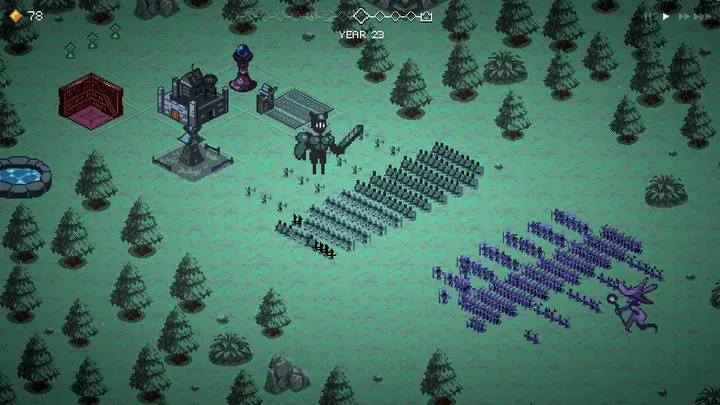
The original game was developed by Sad Socket and first published on PC by Hooded Horse. It earned a review score above 90 percent positive on Steam. The Android version was brought over by the French publisher Playdigious, and it is not a copy of the PC build: the interface was redesigned for touch, with controls built for fingers instead of a mouse.
You may also like:
What 9 Kings Is Not
Because the name sounds like a kingdom-building MMO, it helps to be clear about what you are not getting.
- Not a real-time base-builder. There are no waiting timers or alliance wars like in mobile titles such as Clash of Kings.
- Not pay-to-win. Launch coverage describes a free trial and a one-time unlock, not endless currencies.
- Not an endless grind. It is a roguelike, so you start new runs and improve through experience.
Key Features of 9 Kings APK
Free to Try, One-Time Unlock
You can start playing for free. The full game is a single purchase, reported at $8.99 in the US, with no subscription. Prices vary by region.
Card-Based Kingdom Building
Cards are the core of every run. You play them to construct buildings and expand your domain, so each choice shapes what your kingdom becomes.
Army Growth and Claiming Opponent Cards
Your military grows from the cards you collect and place. One of the game’s signature ideas is claiming cards from your opponents, which lets you turn rival strength into your own.
A Grimoire of Spells
Spells give you a way to step into battles. Timing them well can turn a close fight, and holding a spell for the right moment is part of the strategy.
Nine Kings With Different Playstyles
Each king plays differently, which keeps runs from feeling repetitive. The unlock opens every king, and trying several is one of the best ways to find your style.
Quest Mode
Quest Mode adds varied challenges on top of normal runs, giving you reasons to replay and experiment. Additional quests are part of the unlock.
Asynchronous Multiplayer
In the unlocked version, you face eight rival kings at your own pace. You do not need to be online at the same time as other players, which suits a busy schedule.
Touch-First Interface
The UI was rebuilt for phones and tablets instead of ported directly from the PC version, so menus and cards are designed for taps and swipes.
Short Sessions and a Small Install
The game is built for players who do not have hours to spare, and the reported install of about 660 MB is lighter than most 3D mobile games.
26 Languages
The game supports 26 languages, including French, which makes it easier to follow for a wide audience.
Cross-Progression With PC (Reported)
One release guide says progress can carry between PC and mobile through Google Play Games. Confirm this in the app before relying on it.
How a Run Feels
A typical run starts with a king and a small domain. You use cards to build, grow your forces, and prepare for battles against rival rulers. As you progress, you decide when to expand, when to strengthen your defenses, and when to save a spell for a key fight. When a run ends, you start another one with what you learned.
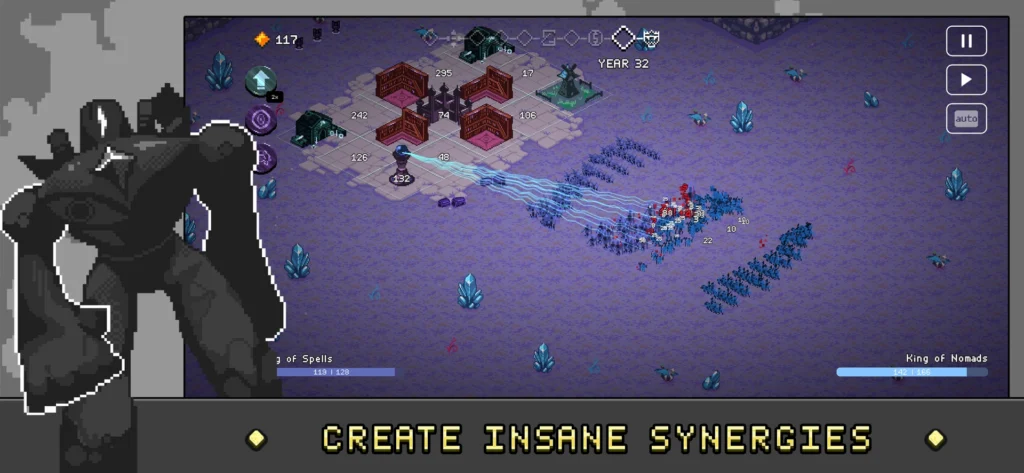
The game has a retro visual style, quick pacing, and a layer of strategy that rewards planning. It is aimed at strategy fans who want depth without a huge time commitment.
What’s Free and What the Unlock Adds
| Free version | One-time unlock (reported $8.99 in the US) | |
|---|---|---|
| Try the game | Yes | Yes |
| Kings | Limited selection | Every king |
| Quest Mode | Limited | Additional quests |
| Asynchronous multiplayer | No | Face eight rival kings at your own pace |
| Price model | Free | One-time purchase, no subscription |
The table summarizes what launch coverage describes. Confirm the exact free-version limits in the app.
Game Information and Requirements
| Detail | Info |
|---|---|
| Game | 9 Kings (mobile) |
| Original developer | Sad Socket |
| Mobile port | Playdigious |
| Release date | October 12, 2026 |
| Price | Free to try, with a one-time unlock |
| Reported size | About 660 MB |
| Reported requirements | Android 10 or newer and 2 GB of RAM (from a secondary source, so confirm before installing) |
| Languages | 26 |
| Package name | com.playdigious.ninekings |
Device Checklist
- Android version: Android 10 or newer is the reported minimum.
- RAM: 2 GB is the reported minimum, though more is better for smooth menus and battles.
- Storage: Leave a gigabyte or more free on top of the install size so updates do not fail.
- Connection: Asynchronous multiplayer needs internet. Single-player offline play is not clearly confirmed, so check in the app.
Beginner Strategy Tips
Roguelike strategy games reward experimentation and punish rushing. These habits help.
- Use the free version to learn the loop. Play a few runs before deciding whether to unlock the game.
- Try different kings. Each one plays differently, so find the style that clicks with you.
- Learn from losses. A failed run is not wasted. Note what weakened you and adjust.
- Balance building and fighting. Pure expansion leaves you weak, and pure military leaves you without long-term power.
- Claim useful cards from opponents. It is one of the game’s core ways to get stronger.
- Save spells for important moments. A well-timed spell in a pivotal battle is worth more than casting early.
- Check Quest Mode. Quests give structure and rewards that help you improve.
- Play in short sessions. The game is designed for it, and quick runs help you spot patterns.
Is the Full Unlock Worth It?
Unlock it if you enjoy roguelikes, deckbuilders, or short strategy sessions, you liked your first few runs, and you want every king, extra quests, and multiplayer.
Wait if you want a long-running MMO with constant events, you dislike repeated runs, or you tried it once and felt nothing.
Because the free version lets you test the core loop, you can decide with real play instead of guessing.
Similar Games on Mobile
| Game | Style |
|---|---|
| Slay the Spire | Roguelike deckbuilder focused on climbing a tower |
| Balatro | Poker-themed roguelike deckbuilder |
| Reigns | Card-based kingdom decision game with short sessions |
| Clash of Kings | Real-time MMO base-builder with timers and alliances |
If you like the roguelike deckbuilder side, the first two are worth a look. If you want a live, always-on empire game, Clash of Kings is closer to what you may have been looking for.
Common Problems and Fixes
The game does not appear for my device. Your Android version or hardware may not meet the requirements. Check your device and region.
The install is slow or fails. Free up storage, use stronger Wi-Fi, and restart the store app.
Progress did not carry over from PC. Cross-progression depends on signing in with the right account in Google Play Games, so confirm you are using the same one.
Multiplayer is not working. Check your connection and make sure you have unlocked the full game, since multiplayer is part of the unlock.
The game crashes on launch. Restart your phone, clear the app’s cache, and reinstall if needed.
I cannot find the unlock. It is offered inside the game. Confirm your payment method and region are supported.
Frequently Asked Questions
Is 9 Kings free on Android?
It is free to try, with a one-time purchase to unlock the full game.
How much does the unlock cost?
It is reported at $8.99 in the US. Prices vary by region.
What does the unlock include?
All kings, additional quests, and asynchronous multiplayer, according to launch coverage.
How big is the download?
About 660 MB, according to launch coverage.
What Android version do I need?
Android 10 or newer is the reported minimum, with at least 2 GB of RAM.
Who made 9 Kings?
Sad Socket developed the original game, and Playdigious handled the mobile port.
Is it pay-to-win?
Based on the launch model, no. It is a free trial with a one-time unlock.
Can I play offline?
Single-player offline play is not clearly confirmed in launch coverage, so check in the app.
Is it the same as the PC version?
It is the same game with a touch-focused interface, though some details may differ.
Is there a 9 Kings mod APK?
There is no official mod. Files marketed as mods or unlocked versions are unverified and unsafe to rely on.
Conclusion
9 Kings is one of the more interesting strategy releases to land on mobile this year: a short-session roguelike with deckbuilding, a fair free trial, and a one-time unlock. Use the download button above, play a few runs, try a couple of kings, and decide from there. If it clicks, the unlock is a reasonable price for a game built around replayability instead of timers.