Burnout 3: Takedown never came out for Android, and for two decades that meant you needed an old console to play it. That has changed, at least for some phones. A fan-made project called Takedown now offers an experimental Android APK that runs the original Xbox version of the game as a native app, with higher resolution, widescreen, and smoother crash cameras. There’s a catch worth knowing up front: the APK contains no game data, so you need your own legally obtained copy of the Xbox disc, a Snapdragon phone or handheld, and a controller. It’s early, but it works.
This guide explains what Burnout 3 is and why people still love it, what Takedawn does and doesn’t include, which devices it has run on, and how the setup works. You’ll also find controller and performance tips, the official ways to play on older consoles, the fake Burnout 3 APKs to avoid, and answers to common questions. If you came for the download, the button below goes to the project’s official releases page, and the rest of the guide helps you get it running, so you can decide whether your phone and your collection are ready for it.
What Is Burnout 3: Takedown?
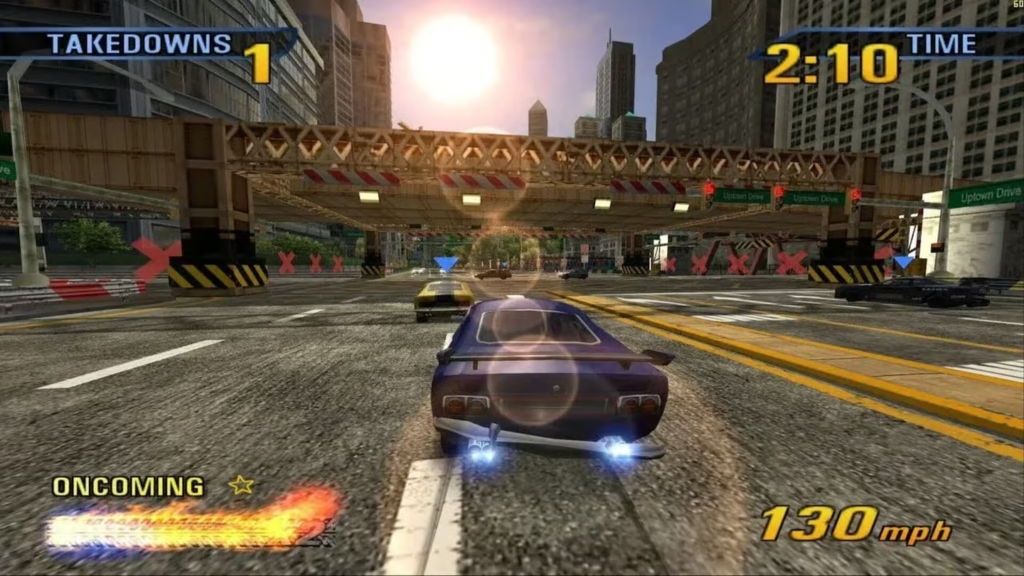
Burnout 3: Takedown is an arcade racing game from Criterion Games and Electronic Arts, released in 2004 for the PlayStation 2 and the original Xbox. It’s famous for mixing breakneck speed with deliberate violence: you race through traffic, but you also win by wrecking your rivals. The name comes from the Takedown system, where you slam into opponents, and the game cuts to a slow-motion crash sequence before dropping you back into the race.
Reviewers and players still call it one of the best racing games ever made, and it has aged better than most of its generation. It’s also stuck in the past in a practical sense. It was never released for Windows or Steam; it isn’t available on current Xbox or PlayStation consoles, and its original online service has been shut down.
You May Also Try:
Key Features of Burnout 3
Takedowns. Aggressive driving is rewarded. You shove rivals into walls, traffic, and scenery to knock them out and earn boost.
Boost for risky driving. Drifting, narrowly missing cars, and driving into oncoming traffic fill your boost meter, so the fastest way to win is also the most dangerous.
Crash mode. The redesigned Crash mode turns a collision into a puzzle: you aim for the biggest pile-up you can cause, and score for the damage.
Road Rage and World Tour. Road Rage focuses on wrecking opponents, while World Tour takes you through races and events across different regions of the world, with highways, city streets, and mountain roads.
Split-screen play. Up to two players can race on one screen, which is how many people remember it.
Is There an Official Burnout 3 APK?
No. Electronic Arts and Criterion have never released Burnout 3: Takedown for Android. Pages offering a “Burnout 3 APK” are either unofficial conversions, emulator guides, or files that can’t be verified. Many of them call the APK “reimagined” without saying what that means, which is a reason to be cautious.
There is one real option, and it’s built differently from those pages.
Takedown: The Android Option That Exists
Takedown is an unofficial, non-commercial fan project. It is not affiliated with Electronic Arts, Criterion Games, or Microsoft. Instead of emulating an Xbox, it takes the original Xbox game’s code, translates it ahead of time into a native program, and supplies the console features the game expects. The result runs as an ordinary app on Windows, Linux, macOS, and Android.
The important detail is what the download does not contain. The project states that no game data is included: no disc images, textures, models, sound, music, or films. You bring that from your own disc, and the app checks the files and copies them into place. The project also asks people not to request or share game files.
Compared with the console version, Takedown adds:
- higher resolution, with Android offering 1.5x by default and higher on stronger devices,
- widescreen with a corrected HUD, plus ultrawide on desktop,
- 60 fps crash cameras instead of the console’s 30,
- support for your own music through a folder of MP3, FLAC, Ogg, or WAV files,
- button prompts for Xbox, PlayStation, Nintendo, and Steam controllers,
- a settings menu you can open mid-race.
Where Things Stand
The project calls the Android build experimental. The project page I read lists it as still being tested, while a release listing dated October 17, 2026 shows version 0.2.0 with an Android APK of roughly 15 MB. Check the releases page for the current state before you plan around it.
What You Need
Takedown is picky, and the requirements are specific.
- A legally obtained disc. It must be the North America (NTSC-U) retail disc for the original Xbox. Other regions and patched files are rejected.
- A disc image of your own copy. The app accepts an ISO, a full disc image, or a folder of extracted files. It doesn’t provide or link to any of these. Rules on copying discs vary by country, so make sure you understand yours.
- Android 13 or newer, 64-bit.
- A Snapdragon chip with Adreno graphics. A Snapdragon 865 or newer is the reported baseline.
- A controller. Built-in or connected, because the game has no touch controls yet.
- About 3 GB of free space. The game data takes around 2.5 GB.
Which Devices Work?
According to the project’s device list:
| Device | Status |
|---|---|
| Retroid Pocket 5 (Snapdragon 865) | Tested, the main reference device |
| Samsung Galaxy S20 FE (Snapdragon 865) | Runs; an hour-long session had no problems, but it slows down once the phone warms up |
| Poco F4 (Snapdragon 870) | Runs, though MIUI can drop the game to 30 fps with a controller |
| Retroid Pocket Classic | Runs |
| Retroid Pocket 6, AYN Odin 2 | Expected to work, not tested |
| AYN Odin 3 | Uncertain, not tested |
| Devices without Snapdragon (Mali, PowerVR, Xclipse) | Not supported yet |
| Samsung Galaxy S23 FE (Exynos) | Starts, but slow, about 30 fps |
If your phone doesn’t have a Snapdragon chip, this isn’t ready for you yet.
How to Set It Up on Android
- Download the APK from the project’s official releases page.
- Allow the install. Android asks whether the app you opened the file with may install unknown apps. Allow it, and turn the permission back off afterward if you like. Google Play Protect may also ask about an app it doesn’t know.
- Copy your disc image to the device, or have it on an SD card.
- Open Takedown. On first start, it asks for the disc image. Pick it with the system’s file picker. It checks every file and copies the data into its own folder, and if the copy is interrupted, you can pick the same image again, and it continues.
- Press Play with a built-in or connected controller.
To update, install the new APK over the old one without uninstalling first. Your saves and settings stay.
Controls
The game uses its own Xbox-style controls. The usual layout puts accelerate on the right trigger, brake and reverse on the left trigger, steering on the left stick, and boost on A. Takedown also offers a PlayStation 2-style layout for driving, plus a Nintendo face-button layout. To open the settings, press Back and Start together, which is Select and Start on a Retroid Pocket.
Settings and Performance Tips
On Android, the first start uses sensible defaults: full screen, 16:9 with the widescreen HUD fix, render scale 1.5, FXAA, and sharpening. If busy scenes drop below 60 fps, lower the render scale one step. Close other apps, and keep the phone cool, since heat is what slows many devices down over time.
The Android build bundles its own open-source graphics driver and loads it inside the app, with no root needed. If you’re on a Snapdragon device and the game is very slow, the project suggests opening the driver page and choosing Automatic.
Other Ways to Play Burnout 3
If a Snapdragon phone isn’t an option, there are other routes. The game runs on the original Xbox and, through backward compatibility, on the Xbox 360, where it’s often easy to find cheaply. It doesn’t work on Xbox One or Xbox Series consoles through backward compatibility. Original online play no longer works anywhere, because the servers were retired.
Beware of Fake Burnout 3 APKs
Many pages list a “Burnout 3 APK” with a version number and a download button. Treat them carefully. They can’t be verified, they often describe themselves vaguely, and Burnout 3 is a commercial game owned by Electronic Arts, so a file claiming to be the whole game is distributing someone else’s work. If you want Burnout 3 on Android, use a project that is open about what it does, like Takedown, and supply your own disc.
Common Problems and Fixes
The setup refuses my disc image. It must be the North America retail Xbox disc. Other regions, patched files, or non-Xbox images are rejected, and the app tells you why.
Android won’t install the APK. Allow the app you opened it with to install unknown apps. If Android says the app conflicts with an existing one, uninstall the other version first and keep its data when asked.
The game is very slow. Make sure you’re on a Snapdragon device with Adreno graphics, and choose Automatic in the graphics driver settings.
No rumble on an external controller. The project notes that the Android controller library can’t rumble external pads, though the phone’s own motor is used with built-in controls.
It hitches in the first races. Shaders compile on first use on Android and are remembered, so each hitch should happen once.
Frequently Asked Questions
Is there an official Burnout 3 APK?
No. EA and Criterion have never released it for Android.
Does Takedown include the game?
No. It includes only the program. You provide the game data from your own disc.
Which version of the game do I need?
The North America (NTSC-U) retail disc for the original Xbox.
Is it an emulator?
No. The game’s code is translated into a native program ahead of time.
Does it work on any Android phone?
No. It needs Android 13 or newer, 64-bit, and a Snapdragon chip with Adreno graphics.
Are there touch controls?
Not yet. You need a controller.
Can I use my own music?
Yes, from a folder of audio files.
Can I play online?
No. The original online service is gone.
Is it free?
The project is free and open source under the MIT license.
Conclusion
Burnout 3: Takedown still plays like a classic, and for the first time there’s a genuine way to run it on an Android handheld or high-end phone. It takes a Snapdragon device, a controller, and a copy of the Xbox disc you own, but it’s open about what it does and doesn’t include. If that matches your setup, grab the APK from the official releases page and give the road a lot of trouble.