
Skate 3 Mobile is real, but it isn’t what the name might suggest. EA never released Skate 3 for Android. Instead, a fan developer known as Buku313 built a native Android port that runs the Xbox 360 version of the game on phones and handhelds, and released it for free on GitHub in August 2026. The APK contains no game files, so you have to bring your own Skate 3 disc image. It’s an experimental developer build with touch controls, a native Vulkan renderer, and a steady stream of fixes. This guide explains how it works, who it suits, and what to expect.
You’ll find what Skate 3 is and why people still play it, the features of the Android port, the requirements, and a step-by-step install. There’s also advice on graphics modes, controls, and phones that handle it best, plus a look at EA’s newer free game, Skate, and the fake Skate 3 APK pages that bundle game files you shouldn’t download. If you’re ready, the button below goes to the project’s official page, and the rest of the guide is here to get you skating without surprises, with honest notes on what works, what doesn’t, and what the project itself says about its limits.
What Is Skate 3?
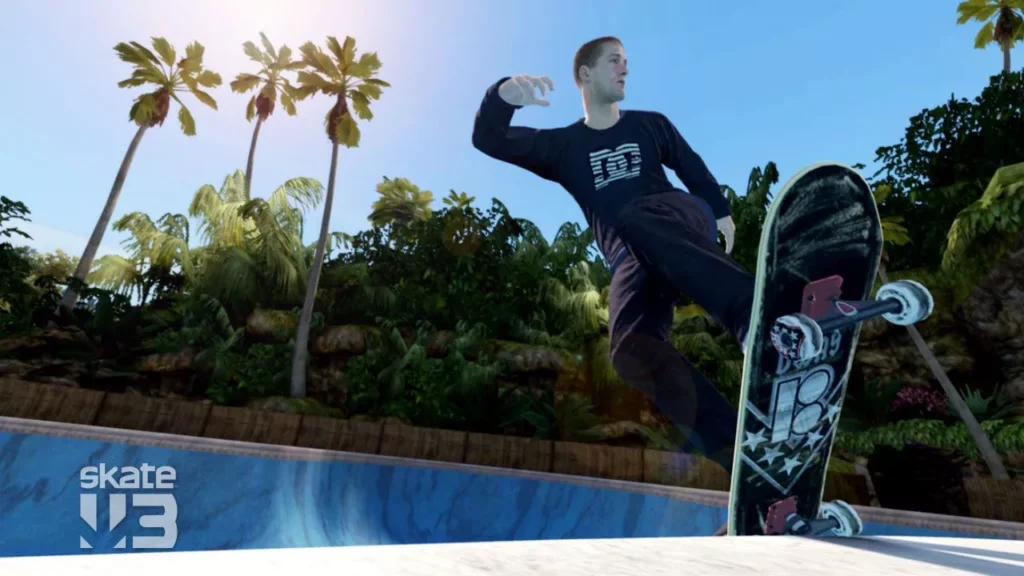
Skate 3 is a skateboarding game from EA Black Box, released in 2010 for the PlayStation 3 and Xbox 360. It’s the third entry in a series that reinvented skateboarding games with its Flickit controls, where you perform tricks by moving the analog sticks the way your feet would move on a real board. The game is set in Port Carverton, a city split into districts full of ramps, rails, and plazas.
You build a reputation as a skater, complete challenges, recruit teammates, and grow your own board brand, with a goal of selling a million skateboards. It offers Easy and Hardcore difficulty settings, a Skate. Park editor for building your own parks, and online modes for competing with friends. It’s also loved for its ragdoll physics, which turn bad landings into spectacular, comic crashes.
Similar Apps:
Is There an Official Skate 3 APK?
No. Electronic Arts has never released Skate 3 for Android. A mobile Skate 3 was reportedly discussed years ago, but I found no sign it was ever released, and the pages claiming to offer an official “Skate 3 Mobile” from EA Black Box are wrong. The Skate 3 Mobile that actually runs on Android is an unofficial fan project, covered next.
Skate 3 Mobile: The Android Port That Exists
Skate 3 Mobile is a native ARM64 Android port created by a developer called Buku313 and built on upstream work by Alex McHugh, with fixes from Andrew Nakas and other contributors. It uses static recompilation: the Xbox 360 game’s code is translated ahead of time into a native app and drawn with a Vulkan renderer. The project stresses that this is not conventional Xbox 360 emulation.
The most important thing to understand is that the APK includes no game assets. The installer reads your own Xbox 360 Skate 3 ISO locally, never uploads it, and doesn’t request broad “all files” access. The project is clear that it’s experimental and unofficial, and that it isn’t affiliated with Electronic Arts, Black Box, Microsoft, or Google.
Key Features of the Port
- A native Vulkan renderer instead of a typical emulator approach
- Touch controls, with a multi-touch Xbox-style overlay you can toggle on and off
- Controller support, for physical or built-in gamepads
- Quality and Performance graphics modes, so you can trade detail for smoothness
- Automatic setup, which extracts and verifies the files and installs Title Update 3
- In-app updates, where the launcher checks for new signed builds and opens Android’s installer without erasing your extracted game files
- A character menu, which includes an alternate skater, opened with RB and Start
What You Need
- A phone or handheld with Android 13 or newer. The build requires 64-bit ARM and Vulkan. It doesn’t support iPhone or 32-bit Android devices.
- Your own Skate 3 ISO. It must be an Xbox 360 disc image dumped from a copy you own. The project doesn’t provide or link to one, and rules about copying discs vary by country.
- About 8 GiB of free space, after your ISO is already on the device.
- A capable device. The project says it’s built for capable mid-range and high-end phones and handhelds.
How to Set It Up
- Download the APK from the project’s official page or its GitHub releases. Most players want the main build, named Skate3-Mobile-Android.apk.
- Allow the install when Android asks whether your browser may install this one app. Google Play Protect may also ask about an app it doesn’t know.
- Open the app and choose “Select My Skate 3 ISO,” then pick your Xbox 360 disc image with the file picker.
- Wait while it works. The app extracts and verifies the files and installs Title Update 3, which takes a minute or more.
- Tap Play.
To update, install the new APK over the existing one without uninstalling, or let the launcher handle it. A separate QA build is available for testing upcoming fixes, and it installs beside the main app.
Which Devices Work?
The project says device support depends on the GPU and driver, and that not every model has been tested. Here’s what has been reported:
| Device | Report |
|---|---|
| Samsung Galaxy S25+ | Used in the project’s demo video |
| ANBERNIC RG406V | Reported to run in Quality mode with richer graphics |
| Retroid Pocket 6 | Tested by a contributor |
| Phones with weaker GPUs | Results vary, with frame rate changing by scene, settings, and temperature |
Android Authority reported in August that the port was playable on a sub-$200 handheld with a Unisoc T820 chip, though it noted the performance preset renders at a very low resolution of 512 by 288, while the quality preset runs at 720p. It also described the port as quite buggy at the time of release, though updates have followed.
Controls
On a phone, the built-in multitouch overlay gives you an Xbox-style layout, and you can switch it off from the top of the game. If you have a controller, Skate 3’s tricks are much easier with sticks, because the Flickit system was designed around them. Open the extra menu with RB and Start.
Performance Tips
Start in Quality mode if your device is strong, and switch to Performance if the frame rate struggles. Close other apps, keep the phone cool, and expect speed to vary when the device heats up. If you’re on a driver that gives you problems, the project recommends the System Driver. Custom graphics driver packages are optional experiments and are never enabled automatically.
About EA’s New Skate Game
Electronic Arts has its own modern Skate. It’s called skate., made by Full Circle, and went into early access on September 16, 2025 for PlayStation 5, Xbox Series X|S, and PC as a free-to-play game. EA said it wouldn’t include loot boxes or pay-to-win elements. Mobile versions for Android and iOS were announced as coming later, but I found no confirmation of an Android release, so check the official listings if you want to know where it stands.
Beware of Fake Skate 3 APK Pages
Some download sites list a “Skate 3 APK” and bundle a separate multi-gigabyte ISO download of the game itself, labeling the whole thing unofficial. A page that hands you the ISO is distributing the copyrighted game, which is the one thing the legitimate project avoids. Stick to the project’s own page, supply your own disc image, and skip any site that offers the game files for you.
Common Problems and Fixes
The app won’t install. Allow the app you opened the file with to install unknown apps, and check that your phone runs Android 13 or newer on 64-bit ARM.
The game is slow or stutters. Switch to Performance mode, close background apps, and let the phone cool down.
The ISO isn’t accepted. The app checks the files, so make sure you’re using an Xbox 360 image of Skate 3.
Updates fail. Install the new APK over the existing one, and don’t uninstall first, because that removes your extracted game files.
It’s buggy. This is an experimental build, so report problems on the project’s bug tracker.
Frequently Asked Questions
Is there an official Skate 3 APK?
No. EA hasn’t released Skate 3 for Android.
Who made Skate 3 Mobile?
A fan developer known as Buku313, building on upstream work by Alex McHugh and fixes from contributors.
Does the APK include the game?
No. You supply your own Xbox 360 Skate 3 ISO.
What Android version do I need?
Android 13 or newer, 64-bit ARM, with Vulkan.
How much space do I need?
About 8 GiB free after the ISO is available.
Does it have touch controls?
Yes, plus support for controllers.
Does it work on iPhone?
No.
Is it an emulator?
The project describes it as a native recompilation, not conventional Xbox 360 emulation.
Is EA’s new Skate. on Android?
Mobile versions were announced for later, but I found no confirmed Android release.
Is Skate 3 Mobile free?
Yes, but you must already own the game.
Conclusion
Skate 3 Mobile is an impressive fan project that brings a beloved game to Android, with real touch controls and a native renderer. It asks a lot from you: a capable device, your own disc image, and patience with an experimental build. If that sounds like your setup, grab the APK from the project’s official page and go find the spots, take the falls, and enjoy the ragdolls.